

How to Get Started with AI for Beginners: Step-by-Step Guide (2026 Edition)
By January 2026, Artificial Intelligence is more accessible than ever. Multimodal models seamlessly process text, images, audio, and video, while agentic AI systems autonomously handle complex tasks. From personalized education to automated workflows, AI empowers everyone.
This enhanced, beginner-friendly guide is perfect for students, professionals, creators, or anyone curious about AI—no technical background required.

📑 Table of Contents
- What Is Artificial Intelligence?
- Why Learning AI Matters in 2026
- Step 1: Understand Core AI Types & Trends
- Step 2: Grasp Essential Concepts
- Step 3: Explore Top AI Tools
- Step 4: Master Prompting Techniques
- Step 5: Free Learning Resources
- Step 6: Ethical & Responsible Use
- Step 7: Apply AI to Your Life
- Step 8: Dive into AI Agents & Automation
- Step 9: Build Lifelong AI Literacy
- Common Beginner Mistakes
- Practical Tips for 2026
- The Future of AI
- Final Thoughts
- FAQs
What Is Artificial Intelligence?
AI enables machines to mimic human intelligence: reasoning, learning, perceiving, and creating content across multiple formats.
Real-World Examples in 2026
- Multimodal assistants handling voice, text, and visuals
- Personalized streaming and shopping recommendations
- Autonomous AI agents for customer service
- Generative tools for art, music, video, and code
- Predictive health and traffic systems
Why Learning AI Matters in 2026
With agentic and multimodal advancements, AI is revolutionizing productivity and innovation.
- Automates repetitive and complex tasks
- Enhances creativity and problem-solving
- Opens doors to new opportunities in all fields
- Equips you for an AI-driven future
No programming skills needed—focus on practical use.
Step 1: Understand Core AI Types & Trends
- Generative AI: Creates text, images, videos, and more
- Multimodal AI: Handles multiple data types simultaneously
- Agentic AI: Plans and executes multi-step tasks independently
Key 2026 Trend: AI agents acting as "virtual assistants" for advanced workflows.
Step 2: Grasp Essential Concepts
- Large Language Model (LLM): The core "brain" of modern chatbots
- Prompt: Your detailed instruction to guide AI output
- Hallucination: When AI generates inaccurate information
- Bias: Flaws inherited from training data
- Retrieval-Augmented Generation (RAG): Improves accuracy with external knowledge
Step 3: Explore Top AI Tools

Best Chatbots for Beginners (2026)
- Grok (xAI): Truth-seeking, real-time insights, witty responses
- ChatGPT (OpenAI): Excellent for writing, coding, and creativity
- Claude (Anthropic): Superior reasoning and safety focus
- Gemini (Google): Seamless integration with search and apps
Image & Video Generation
- Built-in tools in ChatGPT, Gemini, or dedicated like Midjourney
Recommendation: Start with Grok or ChatGPT—both offer free access.
Step 4: Master Prompting Techniques
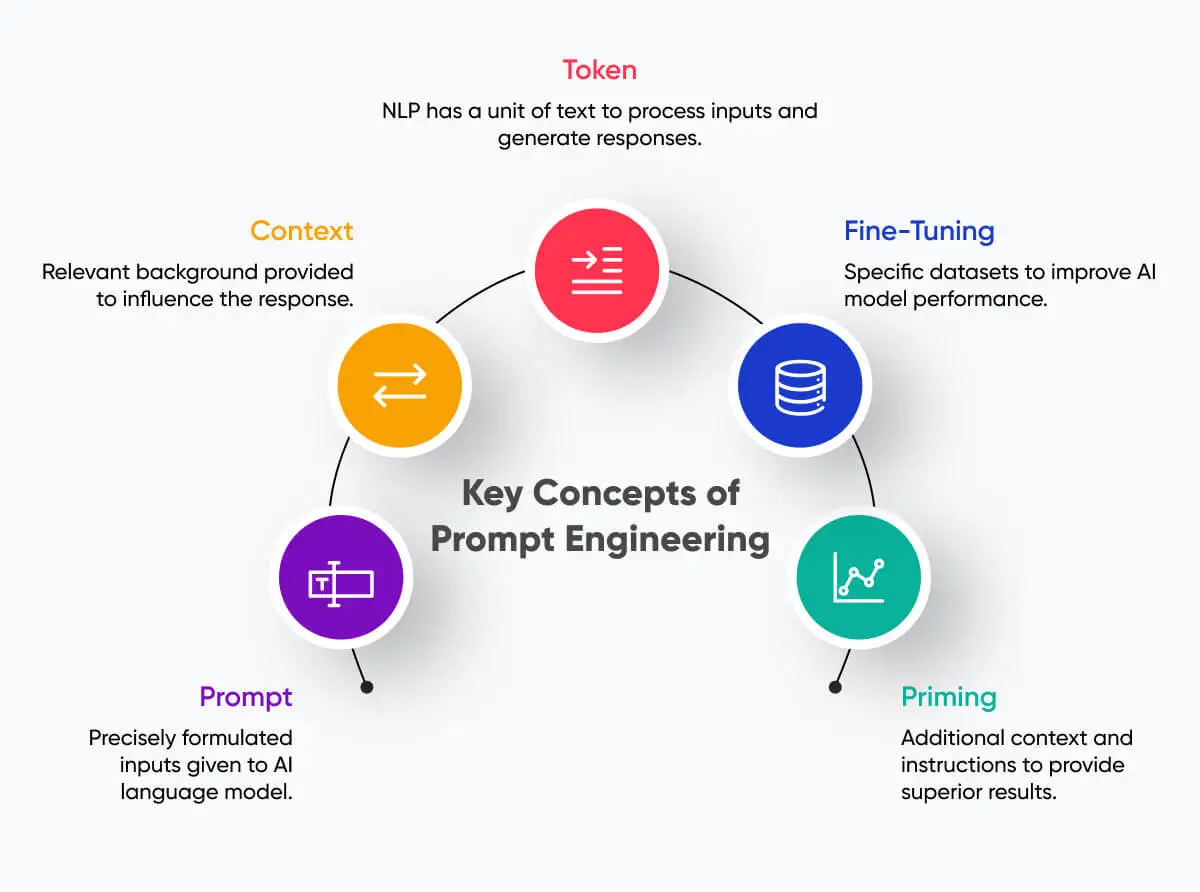
- Be clear, specific, and provide context
- Assign roles: "Act as an expert marketer..."
- Use chain-of-thought: "Think step by step"
- Provide examples (few-shot prompting)
- Specify desired format and length
Strong Example: "You are a professional chef. Create a simple 30-minute vegetarian recipe for 4 people using common ingredients. List steps clearly and suggest variations."
Step 5: Free Learning Resources
- Google AI Essentials – Practical, hands-on introduction
- Elements of AI (University of Helsinki) – Free comprehensive course
- AI for Everyone (Andrew Ng on Coursera) – Non-technical fundamentals
- Grow with Google AI – Focused on prompting and tools
- YouTube channels and interactive demos on Hugging Face
Tip: Practice 20-30 minutes daily for rapid progress.
Step 6: Ethical & Responsible Use
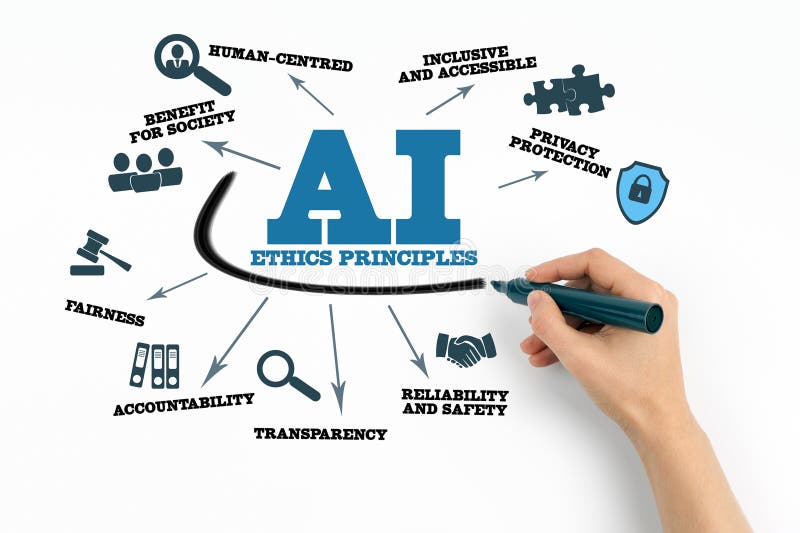
- Always fact-check AI outputs
- Avoid inputting sensitive or personal data
- Identify and mitigate potential biases
- Apply critical human judgment
- Be mindful of environmental impact
Step 7: Apply AI to Your Life
- Students: Summarize texts, generate quizzes, explain concepts
- Professionals: Draft emails, reports, and presentations
- Creators: Ideate content, edit, optimize for SEO
- Personal: Plan meals, travel, fitness, or learn skills
Step 8: Dive into AI Agents & Automation

The 2026 breakthrough: AI agents that independently research, plan, and execute tasks.
- Experiment with agent modes in ChatGPT or Gemini
- Use no-code platforms like Zapier with AI
- Automate research, scheduling, or content creation
Step 9: Build Lifelong AI Literacy
- Follow AI developments on X or reputable sources
- Test new tools and features regularly
- Join communities like Reddit's r/artificial
Common Beginner Mistakes
- Trusting AI outputs blindly
- Using vague prompts → suboptimal results
- Over-dependence without developing skills
- Neglecting privacy and ethical considerations
Practical Tips for 2026
- Begin with one tool and one daily application
- Refine prompts iteratively for better outcomes
- Combine multiple tools for powerful results
- Stay curious and keep experimenting
The Future of AI

Throughout 2026 and beyond: Increased autonomy, on-device processing for privacy, deeper multimodal capabilities, and AI as true collaborative partners in discovery and creation.
Final Thoughts
January 2026 is an ideal time to begin your AI journey. Tools are intuitive, resources abundant, and benefits immense. With consistent practice and responsible use, you'll gain a valuable edge—no expertise required.
Frequently Asked Questions (FAQs)
Do I need coding skills?
No—modern AI tools are designed for everyone.
Best tool to start with?
Grok, ChatGPT, or Gemini—all have generous free plans.
How fast can I learn the basics?
2-4 weeks with regular hands-on practice.
Is AI safe to use?
Yes, when following privacy and ethical best practices.
Will AI take jobs?
It transforms roles—mastering AI collaboration gives you an advantage.
